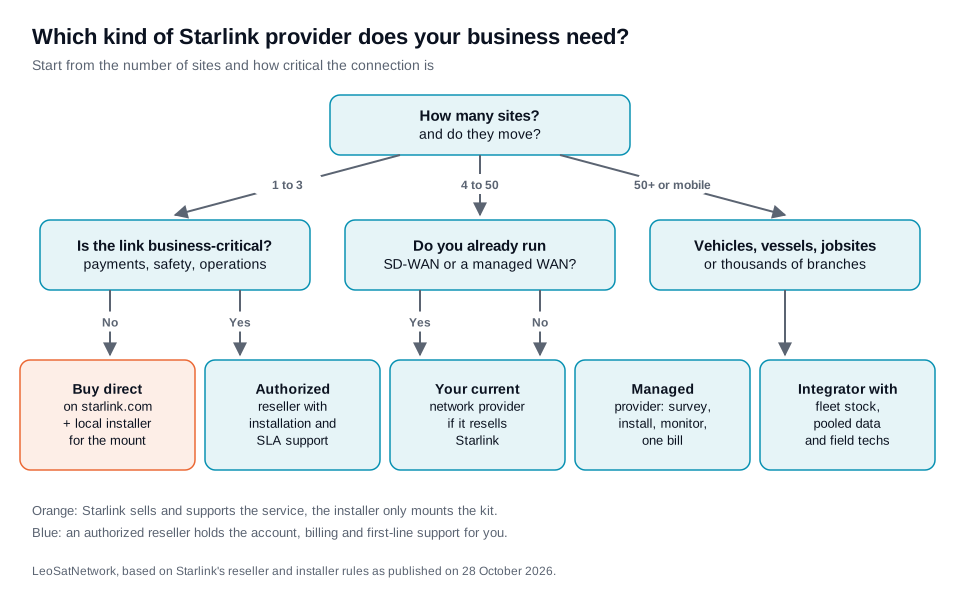
To choose a Starlink installer for a business, first decide who should hold the Starlink account. If you buy Starlink Business yourself on starlink.com, you only need an installer to mount the kit and run the cable. If the link carries payments, safety systems or operations at several sites, you need an authorized Starlink reseller or a managed provider: it sells you the service, installs it, monitors it and opens tickets with Starlink for you. The point matters because Starlink's own installer network covers residential plans only. On 28 October 2026 Starlink's Help Center listed third-party installers in 33 countries and territories "for Residential plans only", so a business site always goes through an independent installer or a reseller. This guide explains how to tell them apart, what a business quote should cover, what installation costs, ten questions to ask, and the warning signs. It uses Starlink's published rules and the directory of 227 authorized resellers that Starlink publishes, both read on 28 October 2026.
Installer, reseller, managed provider: who does what
Three kinds of company install Starlink for businesses, and they are not interchangeable. The difference is who holds the account and who you call when the link fails.
| Type | Who holds the Starlink account | What they do | Typical fit |
|---|---|---|---|
| Independent installer | You, on starlink.com | Survey, mount, cable, router placement, sometimes Wi-Fi. Paid per job. | One office, a farm, a warehouse, a holiday park with a simple layout |
| Authorized reseller | The reseller | Sells the service and hardware, bills you, provides first-line support; most also install. | Businesses that want one supplier, local billing or a local language |
| Managed provider or integrator | The provider (as an authorized reseller) | Adds failover, SD-WAN, monitoring from a network operations centre, spare kits, pooled data and one invoice for every site. | Chains, fleets, construction groups, public agencies |
Starlink states the rule plainly: when you buy from an authorized reseller, "you manage your account, service, billing, and support exclusively through the reseller, not through Starlink." That is an advantage when the reseller is good, because you get one phone number and someone who knows your network. It is a risk when it is not, because you cannot go around it. Choosing the company therefore matters more than choosing the hardware.
Independent installers are a different trade. Many come from satellite TV, CCTV or electrical work. They are often the right answer for a single site, but they do not sell Starlink service and cannot change your plan, open a priority ticket or replace a kit under warranty for you.
Why Starlink's own installers do not cover business sites
Starlink runs a third-party installation programme, but it is built for homes. Its Help Center describes these installers as available "in select markets for Residential plans only". A standard installation "typically takes around 90 minutes" and includes a site assessment on the day, a standard mount, a cable run to the nearest entry point and activation. Pole mounts are excluded ("cannot be performed by installers"), deinstallation is not supported, and longer cables, trenching or special routing cost extra.
The named partners on 28 October 2026 were OnTech in the United States and Puerto Rico, SAT-Works in the United Kingdom, Ireland, Greece, Cyprus, Croatia, the Baltic states and Zimbabwe, CIRCL in Australia, Alltec in New Zealand, Omadata in Indonesia, Visiontec and Vivensis in Brazil, T.E.S.A.M in Peru, SOLMAIOR in Portugal, Starnet in Albania, and SBPM in a dozen European countries (including France, Germany, Italy, Spain and the Benelux) as well as Canada, Japan and Kenya, with Solutions30 covering part of Poland. If you run a business on a Business or Priority plan, none of them is your installer by default. You need an independent installer or a reseller, which is why this guide exists.
Which Starlink kit for a business site
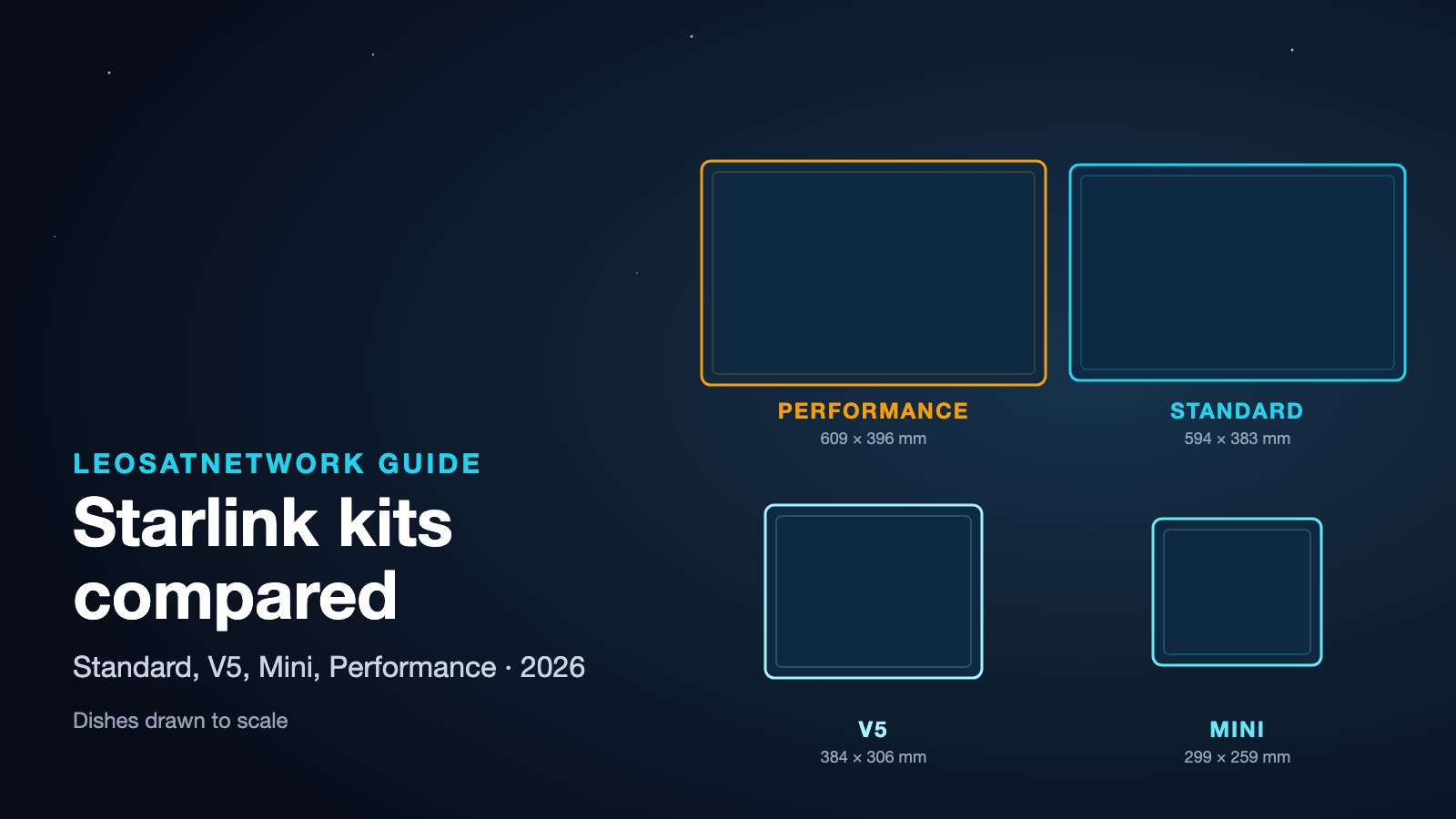
For most fixed business sites the choice is between the Standard kit and the Performance kit; the Mini is for vehicles and light mobile use. A good installer explains the trade-off instead of defaulting to the most expensive option.
| Kit | Strengths | Limits | Business fit |
|---|---|---|---|
| Standard | $349 in the US, the kit resellers keep in stock, fast enough for most offices | Router is Wi-Fi only: wired networks need the Ethernet adapter; not rated for in-motion use | Offices, shops, farms, backup lines |
| Mini | Router built in, runs from DC, rated for in-motion use, low power | Lower capacity than the larger dishes | Vans, field teams, small kiosks, pop-up sites |
| Performance | Up to 400+ Mbps, aluminium enclosure, AC or DC power, 3-year warranty, designed for permanent installation and in-motion use | Higher price, heavier mount | Exposed or remote sites, vessels, vehicles, sites that need a long service life |
The most common avoidable mistake on business sites is the Standard router: it has no Ethernet port by default, so a site that connects Starlink to a firewall or switch needs the adapter, or the Starlink router set to bypass mode behind your own router. Ask the installer which they will use and why.
Three failover designs installers use
How Starlink joins your network matters as much as where the dish goes. Three designs cover most business sites:
- Dual-WAN router or firewall. Starlink plugs into a second WAN port on the router you already have. When the main line fails health checks, traffic moves to Starlink and back again when the line returns. Cheap and simple; works for a single office or shop. Check that the router supports Starlink's addressing and that the health check targets something outside your ISP's network.
- SD-WAN. An SD-WAN appliance at each site measures every path and steers traffic by application: card payments and voice on the best link, guest Wi-Fi on whatever is left. It is the standard design for chains and branches, and it is why 76% of Starlink's authorized resellers list SD-WAN integration.
- Bonding with cellular. A bonding router (Peplink is common on construction sites) combines Starlink with one or two 4G or 5G links into a single connection, so a short Starlink obstruction or a cellular dropout does not break a video call. 58% of authorized resellers list terminal bonding.
Whatever the design, the failover must be tested: unplug the main line during the handover and check that payments, phones and remote access keep working. Ask for that test in the scope.
What a business Starlink quote should cover
A business quote is complete when it covers six things: survey, hardware, mounting and cabling, network integration, the service plan and billing, and support. Installers usually price the first three. Resellers and managed providers price all six. When two quotes differ by a factor of three, it is usually because one of them stops after the cable.
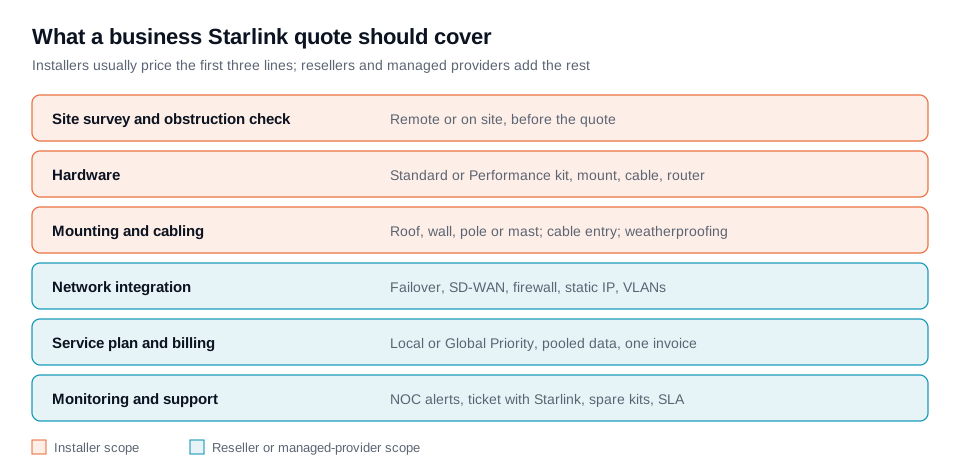
- Survey. The installer checks the field of view with the Starlink app or a site visit, picks the mount position and the cable path, and flags obstructions such as trees, neighbouring buildings or rooftop plant. A remote survey from photos is fine for a simple roof; a site with several buildings or a mast needs a visit.
- Hardware. Businesses choose between the Standard kit and the Performance kit. Starlink describes the Performance kit as enclosed in aluminium, with AC or DC power, a 3-year warranty, "built for 10-year survivability", and download speeds "up to 400+ Mbps". It is the kit for permanent outdoor installation, vehicles and vessels.
- Mounting and cabling. Roof, wall, pole, mast or ballast mount; the cable entry; weatherproofing; and sometimes trenching to an outbuilding.
- Network integration. Connecting Starlink to your existing router or firewall, setting it up as primary or backup, steering payment or voice traffic, and requesting a public IP where you need inbound access.
- Service plan and billing. The data plan, who pays Starlink, and whether data is pooled across sites.
- Monitoring and support. Who watches the link, who calls Starlink, how fast a failed kit is replaced, and what the provider commits to in writing.
What business installation costs in 2026
Business installation prices are rarely published, but the ones that are fall between about $600 and $1,500 per site in the United States for a standard commercial job, before hardware and service. Two US installers that publish prices on their own sites (checked 28 October 2026):
| Item | Published price | Source |
|---|---|---|
| Business installation, standard (5 to 25 users) | from $899 | Dish Ninjas, commercial installation page |
| Business installation, high performance (25 to 50+ users) | $1,499 | Dish Ninjas |
| Commercial or business installation (labour) | from $899 | Starlink Local Installers, pricing page |
| Pole mount (first 10 feet of trenching included) | from $699 | Starlink Local Installers |
| Extra trenching | $10 per linear foot | Starlink Local Installers |
| Service call | $250 | Starlink Local Installers |
Two things shape the price more than anything else: height and distance (a mast, a flat roof that needs a ballast mount, a cable run of 50 metres to a server room) and integration (configuring failover in an existing firewall takes longer than placing the Starlink router on a shelf). For homes, Starlink's own partner prices are lower: in the United States professional installation through OnTech is included with the two faster Residential plans and costs $199 with the entry tier, as set out in our US price guide.
The service itself is priced by Starlink, not by the installer. In October 2026 the US Business page advertises service "starting at $55/mo with a hardware cost of $349". Local Priority plans are sold in blocks of priority data ($55 for 50 GB, $155 for 500 GB, $280 for 1 TB). Starlink says Priority plans include "24/7 prioritized support, a publicly routable IPv4 address, and a Service Level Agreement". Ships and aircraft use Global Priority, covered in our Starlink Maritime vs VSAT guide. Prices for other countries are on our Starlink price page by country.
Worked example: a five-site business
Take a regional retailer with five stores that wants Starlink as a backup behind fibre, in the United States, buying direct and hiring an installer. Hardware is $349 per kit on the Business page, so $1,745. Installation at the published $899 starting price is $4,495. Service at 50 GB of priority data per store is $55 a month each, so $275 a month, or $3,300 a year. First-year total: about $9,540 before router configuration. A managed provider would quote a single monthly fee per store instead, usually with installation spread over the contract and with monitoring and failover tests included. Compare the two on the total over three years, not on the first invoice.
How a business installation runs, step by step
- Brief (day 1). You describe the sites, the use and the deadline. A reseller asks for addresses and network diagrams; an installer asks for photos of the roof and the comms room.
- Survey (days 2 to 10). Remote check with satellite imagery and the Starlink app's obstruction tool, or a site visit for complex sites. The survey fixes the mount position, the cable route and the kit.
- Quote and order (week 2). A written scope with exclusions. If you buy service direct, you order the kits on starlink.com; a reseller orders them for you.
- Installation (half a day to a day per site). Mount, cable entry, weatherproofing, router or firewall connection, activation.
- Turn-up and test. Speed and latency test, failover test, handover of the account details and the monitoring access.
- Run. Alerts, firmware updates (Starlink updates its own terminals), plan changes and kit replacement. This is where a managed provider earns its monthly fee.
Billing starts when the kit first connects or seven days after delivery, whichever comes first, whether or not the installer has come (Starlink states this for its residential installations), so schedule the installation before the kits arrive on site.
Who does what in Starlink's reseller network
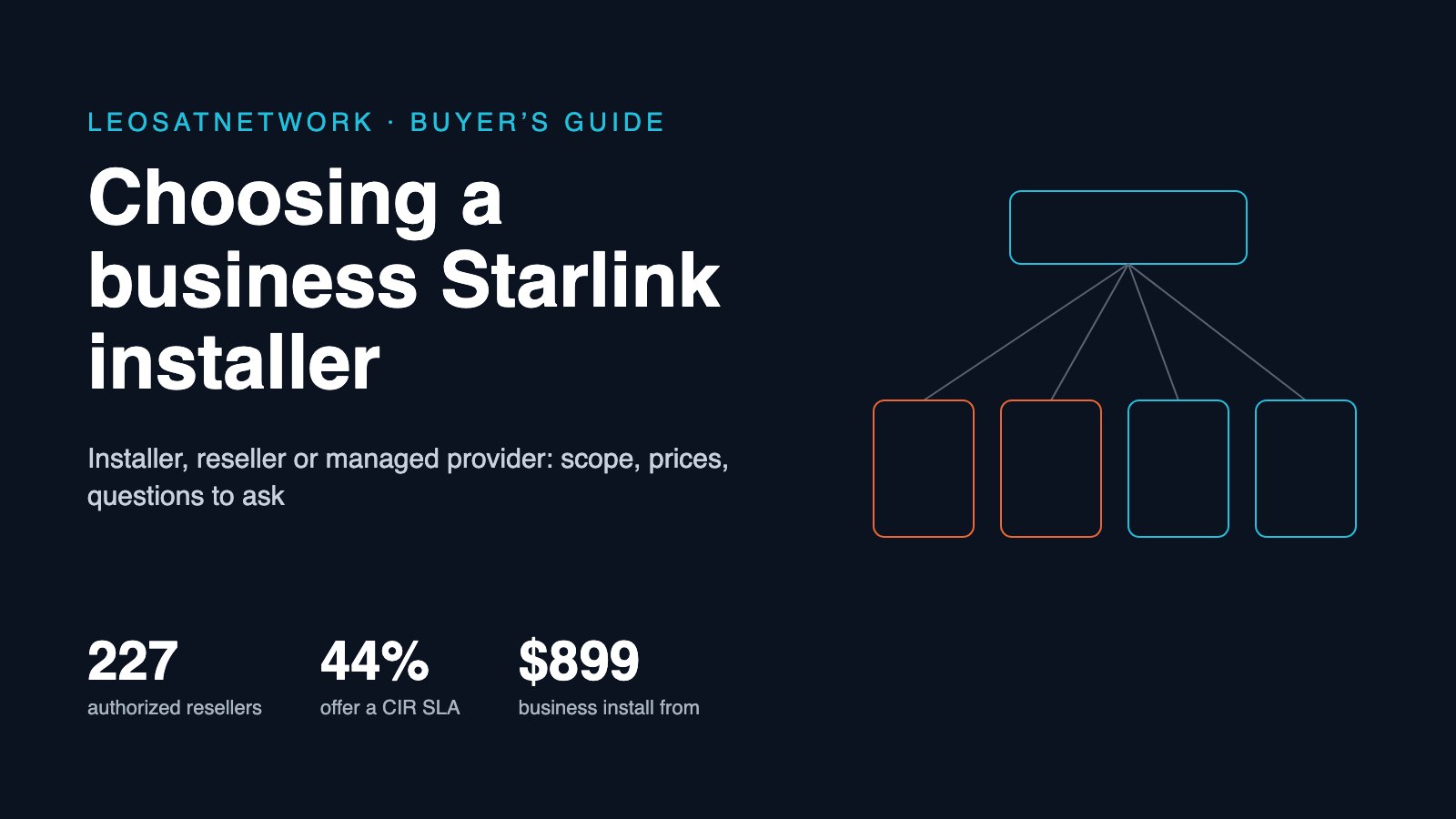
Starlink publishes a directory of its authorized resellers on starlink.com/resellers, with the value-added services each one declares. On 28 October 2026 it listed 227 companies. Read across all 227, the services show where the market is mature and where you need to check.
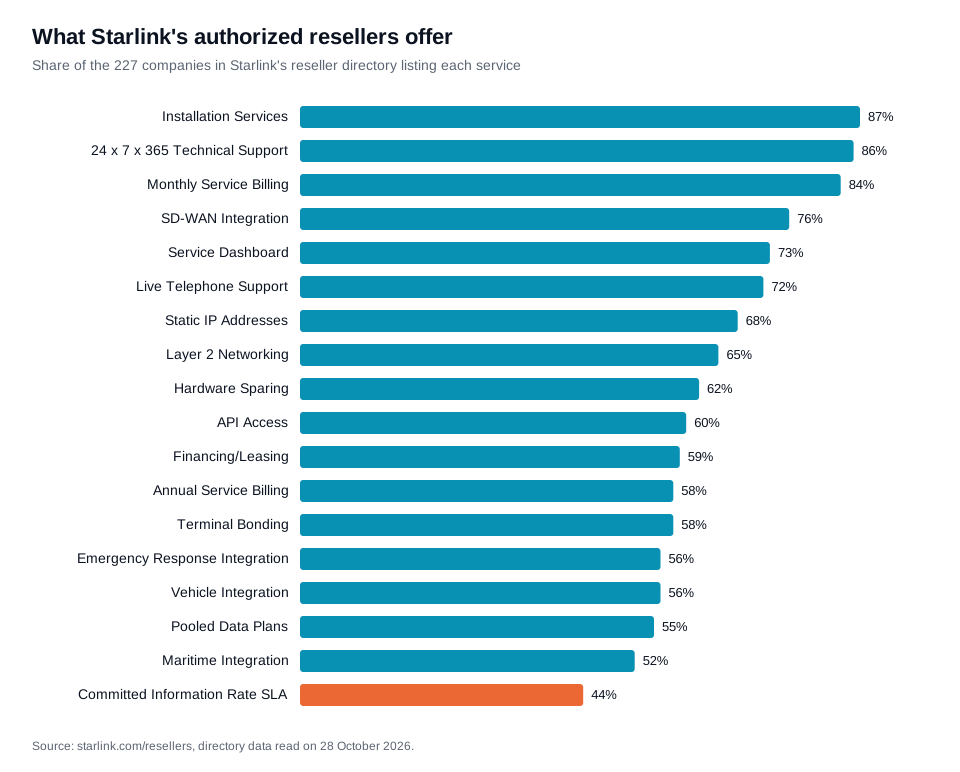
Almost nine in ten list installation and round-the-clock support. Three in four list SD-WAN integration. But only 55% offer pooled data plans, 62% keep spare hardware, and only 44% offer a committed information rate (CIR) SLA, meaning a guaranteed minimum bandwidth. If your business case depends on one of those, it is the first question to ask, and it narrows the field quickly.
Ten questions to ask before you sign
- Are you on Starlink's authorized reseller directory? If the company sells you service, it should be on starlink.com/resellers. An installer who only mounts the kit does not need to be. A company that sells service without being listed is either an indirect reseller working through someone else (and must say so) or is not authorized.
- Who will hold the Starlink account, and can I move it? Ask what happens to the terminals and the service lines if you leave at the end of the contract.
- Do you install with your own staff or subcontract? Subcontracting is common and not a problem in itself; what matters is who is insured and who comes back when something breaks.
- What does your survey include, and is it charged? Some installers credit the survey fee against the job; others survey remotely for free and charge for a visit.
- Which kit do you recommend, and why? A good installer explains when the Standard kit is enough and when the Performance kit is justified (exposed sites, vehicles, DC power, long life).
- How will Starlink connect to my network? Primary or backup, which router or firewall, which traffic switches over, and how the failover is tested.
- What is in the SLA? Starlink's Priority plans come with Starlink's own SLA. Ask what the reseller adds: response times, replacement times, and whether a CIR is offered.
- Can data be pooled across sites? Pooled data stops one busy site from running out while another uses nothing.
- Who monitors the link and how do I see it? A dashboard, alerts to your team, an API, or only the Starlink app.
- What is the total cost over three years per site? Hardware (bought, financed or included), installation, service, the managed fee and any minimum term.
Warning signs
- Claims of being "official" without a listing. Starlink tells indirect resellers they may not use Starlink logos or call themselves an "authorized Starlink reseller". Check the directory.
- Hardware from unlisted sellers. Starlink says hardware bought from unauthorized retailers cannot be activated and that buying from an unlisted third party may lead to immediate suspension of service.
- Pickup at a Starlink office. Starlink warns that it "does not distribute equipment or offer customer pickup at legal, corporate, or representative office addresses". Instructions saying otherwise may be fraudulent.
- Cut or spliced cables. The Starlink cable should not be cut and rejoined. An installer who proposes it to save time is not a Starlink specialist.
- No obstruction check. A quote for a fixed price without any look at the sky view is a guess.
- No written scope. If the quote does not say what is excluded (pole, trenching, firewall configuration), the extras will appear on the invoice.
Primary or backup: how the choice changes the installer you need
As a backup, Starlink sits behind your fibre or cable line and only carries traffic when the main link fails. The installer's job is mostly network work: making sure the switchover happens automatically, that payments and voice keep working, and that someone is told when it happens. A small data plan is usually enough. As a primary link, Starlink carries everything, so the survey and the mount matter more, the plan must be sized for real usage, and a second path (often 4G or 5G through a dual-WAN router) is worth adding.
By use case
Retail chains, restaurants and convenience stores
The priority is uptime of point-of-sale, card payments and store systems. Look for SD-WAN integration, failover testing and one invoice for all stores. Our guide to managed Starlink providers in the US compares eleven companies that do this at scale.
Construction sites and temporary locations
Sites need connectivity before any fibre arrives and only for the length of the project. Look for providers that keep kits in stock, bond Starlink with cellular, move equipment between projects and pool data across sites. Ask about ballast or trailer mounts that avoid drilling.
Ships and offshore
Maritime use runs on Global Priority and the Performance kit, and the installer must know marine cabling and the vessel's network. See Starlink maritime integrators and our maritime guide.
Remote industrial sites: mining, energy, agriculture
Distance and power drive the job: masts, solar or DC supply, long cable runs and lightning protection. Prefer integrators who have done comparable sites and can show photographs or case studies.
Public sector and emergency services
Agencies need clear answers on where traffic goes, who holds the accounts and how kits are replaced in the field. 56% of Starlink's authorized resellers list emergency response integration, so ask for references from other agencies.
Vehicles and fleets
In-motion use needs the right kit and a vehicle installer: 56% of authorized resellers list vehicle integration. RV outfitters are a different market from fleet integrators; check which one you are talking to.
Buying direct vs through a reseller
| Direct on starlink.com + installer | Authorized reseller or managed provider | |
|---|---|---|
| Price of service | Starlink's list price | Usually a per-site fee that bundles service and support |
| Account and billing | Yours, by card or invoice, one plan per terminal | The reseller's, often one invoice and pooled data |
| Support | Starlink support tickets, prioritized on Priority plans | The reseller's helpdesk, which escalates to Starlink |
| Integration | Your IT team | Included or quoted by the provider |
| Best for | One to three sites, simple layouts | Many sites, critical links, mobile assets |
How to get quotes
Write one page that describes each site (address, building type, roof or ground, distance to the comms room), what the link will carry, whether it is primary or backup, and when you need it live. Send the same page to three companies so the quotes are comparable. On LeoSatNetwork you can describe your project once and we send it to up to five installers and resellers that serve your area; they answer you directly and we take no commission. You can also browse Starlink installers, authorized resellers and enterprise satellite integrators, or go by country: United States, United Kingdom, France, Germany, Spain, Australia and Canada.
If you are an installer or reseller and want to receive these requests, see our guide on how to become a Starlink authorized reseller and list your company.
Sources
- Does Starlink provide installers?, Starlink Help Center (third-party installers by country), read 28 October 2026.
- Who is a Starlink authorized reseller?, Starlink Help Center, read 28 October 2026.
- Who is a Starlink authorized retailer?, Starlink Help Center, read 28 October 2026.
- Indirect Reselling Program, Starlink Help Center, read 28 October 2026.
- Starlink Authorized Resellers directory, starlink.com, data read on 28 October 2026.
- Starlink for Business, starlink.com (US), read 28 October 2026.
- Commercial Starlink installation, Dish Ninjas, read 28 October 2026.
- Pricing, Starlink Local Installers, read 28 October 2026.