Starlink is available across the whole of the United Kingdom, and in October 2026 it costs £40, £60 or £80 a month depending on the Residential speed tier your address is offered, with no upfront hardware cost in select areas (the Standard kit starts at £299 elsewhere). Professional installation is a separate, independent market: published prices start at £145 for a standard mount. This guide walks through plans, hardware and installation with figures checked on starlink.com on 21 October 2026, and ends with the installers and resellers we list in the UK.
Is Starlink available in the UK?
Yes. Starlink has been live in the UK since 2021 and covers the whole country, from Cornwall to Shetland and including Northern Ireland (the Channel Islands and the Isle of Man are served too, under their own terms). Capacity is the only limit: the two cheaper Residential tiers are only sold in cells with spare capacity, so a busy suburb may only be offered Residential Max while a Highland glen gets all three. Check your exact address on starlink.com before ordering; availability is decided per cell, not per postcode.
Ofcom regulates Starlink as a satellite broadband service. You do not need a licence for the terminal, and the dish is treated like a satellite TV dish for planning purposes in most cases, with the usual exceptions for listed buildings and conservation areas (more on that below).
What Starlink costs in the UK (October 2026)
The UK line-up moved several times in 2026: the Residential 100 Mbps tier launched at £35 in January, every plan rose by £5 a month on 18 June, and a £10 monthly kit rental fee was introduced for new customers in early June and withdrawn in mid-July. The figures below were checked on starlink.com on 21 October 2026 and had not changed since our 17 September check; expect them to move again.
| Plan | Price | What you get |
|---|---|---|
| Residential 100 Mbps | £40 / month | Unlimited data, download capped at 100 Mbps, uploads around 15–35 Mbps. Select areas only. |
| Residential 200 Mbps | £60 / month | Unlimited data, download capped at 200 Mbps. Select areas only. |
| Residential Max | £80 / month | Maximum available speeds (advertised up to 400+ Mbps) and top Residential network priority. Not limited to select areas. |
| Hardware | No upfront cost in select areas, otherwise the Standard kit from £299 | Dish, router, cables and stand. Pausing the service (Standby mode) costs about £9 a month. |
| Roam 100 GB | £55 / month | Portable use across Europe and the UK; unlimited low-speed data after 100 GB. Roam hardware from £179 in selected areas. |
| Roam Unlimited | £100 / month | Unlimited high-speed data on the go, international travel in 160+ countries, in-motion use in selected areas. |
| Business (Local Priority) | from £30 / month | Priority data in 50 GB or 500 GB blocks, public IPv4, 24/7 prioritised support and an SLA. Global Priority (worldwide, incl. at sea) starts around £215. |
Two things people miss: there is no minimum term on Residential (you can cancel monthly, and a kit you bought is yours to keep), and the 30-day trial covers the service and hardware, not a professional installation. Make sure the service works at your address before you book an installer.
Professional installation: what UK installers charge
A self-install takes an afternoon if you have a clear view of the sky from a garden or a low roof. People hire a professional when the only unobstructed spot is a chimney or a two-storey roof, when the cable run into the house needs to be tidy, or when a business needs the connection configured and tested. Unlike in the US, Starlink does not bundle an installation service in the UK, so the market is entirely independent installers.
Published UK prices (August 2026):
- Standard residential install (roof or wall mount, cable run, router placed): advertised from £145 (HomeVision), £200 (Space Internet Installations) and £249 (Currys). Confirm what each price includes: mount, cable length, router setup.
- Complex installs (chimney mounts, scaffold or cherry-picker access, long or underground cable runs, listed buildings): one UK cost guide puts these at £250–£900 depending on the building.
- Business and multi-building sites (mast, links between buildings, failover with an existing line): quoted per site after a survey.
- Extras: outdoor Wi-Fi nodes, the Ethernet adapter, surge protection or a second dish for redundancy are priced separately; ask for them as line items.
Ask every installer for three things in writing: the mount type and how it is fixed to the structure, the cable route (with drilling points), and whether the price includes VAT and travel. A good UK installer will also run a site survey with the Starlink app to show you the obstruction map before drilling anything.
Do you need planning permission for a Starlink dish?
Usually not. In England and Wales a dish on a house generally falls under permitted development, with the same size and position limits as satellite TV dishes; Scotland and Northern Ireland have their own versions of the rules. Listed buildings, flats and conservation areas are different, and some councils ask for the dish to be out of sight from the road. Installers who work in these areas know the local practice; ask before you buy the mount.
Which Starlink kit for which situation
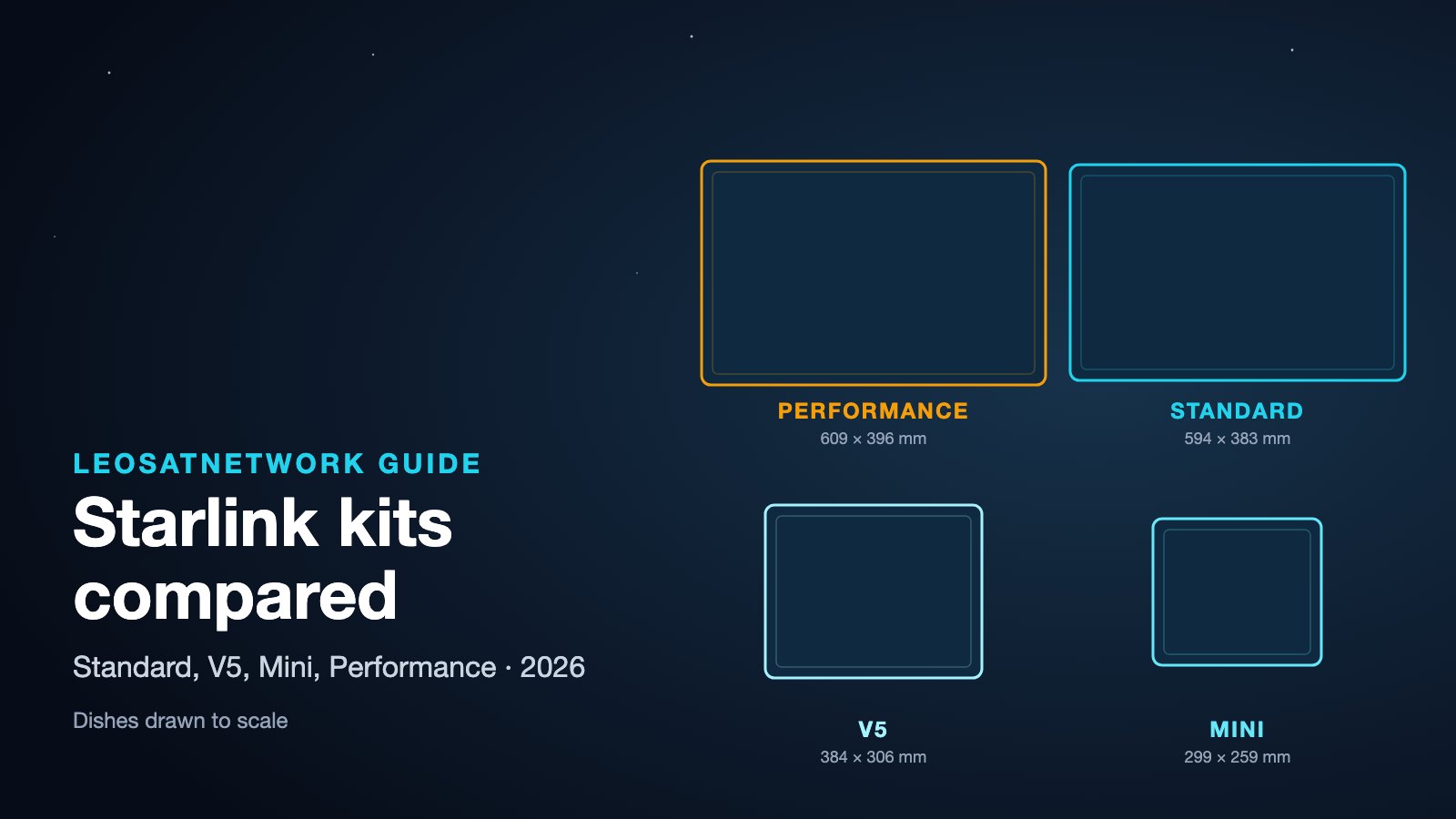
- Home or small office: the Standard kit, included with the plan where the no-upfront-hardware offer applies. It is what every installer is used to mounting.
- Vans, small boats, remote cabins with limited power: the Mini. It has the router built in, draws about 25–40 W and runs from DC: a 12 V adapter or a 100 W USB-C power bank with the right cable.
- Businesses, farms with several buildings, marine and fixed sites that need priority data: the Performance kit (the successor to the Flat High Performance dish), usually installed professionally with a Local or Global Priority plan.
If you are unsure, take the Standard kit: it can be moved to a Roam plan later, and it is the kit resellers keep in stock.
What speeds to expect in the UK
Starlink now sells speed by tier, and the caps are real: Residential 100 Mbps and 200 Mbps are throttled at those figures. Residential Max is advertised at up to 400+ Mbps; what you actually get depends on how busy your cell is, with evenings in the busier cells around larger towns at the low end. Starlink quotes uploads of about 15–35 Mbps and latency of roughly 20 ms for the UK. That is enough for several simultaneous video calls, streaming in 4K and remote work; it is not symmetrical fibre, so anyone who regularly uploads large files (video production, off-site backups) should judge the connection on the upload figure.
Obstructions matter more than distance from anything: a single tree branch crossing the dish's field of view causes short, repeated drops rather than a slower connection. Run the Starlink app's obstruction check at the spot you have in mind before mounting anything, then let the connected dish log obstructions for a day before you make the mount permanent.
Starlink versus the alternatives in the UK
- Full fibre (FTTP): if Openreach or an altnet has reached your address, fibre is almost always cheaper and faster. Starlink is the answer where the fibre build stops at the village edge, or as a backup line that does not share the fibre's trench.
- 4G/5G home broadband: cheaper (£20–£35 a month) and worth trying first if you have a strong outdoor signal; speeds can fall when the local mast is congested or the signal is weak.
- Geostationary satellite: much higher latency (600 ms and more); worth considering only where Starlink is unavailable or unsuitable.
- Eutelsat OneWeb via a reseller: a business-only option sold through integrators for sites that need contracted service levels; several of the UK companies we list offer both.
Common mistakes UK installers see
- Mounting the dish under the eaves or against a wall to hide it: in the UK the dish tilts towards the northern sky, so an overhang or the house itself on that side blocks it. The app shows the direction it needs clear.
- Running the cable through a window frame: the Starlink cable is proprietary and cannot be spliced or shortened, so plan the entry point before you buy a mount.
- Using the ground stand permanently on a lawn: fine for the trial, but wind and lawnmowers are not kind to it.
- Forgetting the router placement: the Standard kit's router has no Ethernet port by default; order the Ethernet adapter if you need wired devices or a mesh system.
Starlink installers and resellers in the UK
The United Kingdom is the largest Starlink market in our directory: we list 30 Starlink companies, of which 24 offer professional installation and 19 are resellers selling kits and business plans (many do both). They range from one-van aerial specialists in Cornwall and Scotland to national integrators handling maritime and enterprise deployments.
Use the listings rather than a generic search: each profile shows the services offered (residential, business, maritime, vehicles), the area covered and the contact details, and you can request quotes from several at once.
- Starlink installers in the UK — companies that mount and commission the dish.
- Starlink resellers in the UK — kits, Business and Priority plans, maritime hardware.
- All Starlink providers in the UK — installers, resellers, integrators and consultants.
How to choose an installer
- Check they work in your area (many list counties or a radius from their base).
- Ask for a photo of a recent install similar to yours: same roof type, same mount.
- Confirm they are insured for working at height; roof work is where things go wrong.
- Compare the total price including VAT, travel and the mount, not the headline figure.
- For business use, ask whether they can configure failover with your existing broadband and whether they resell Priority plans directly.
What to budget
In October 2026, budget £40 to £80 a month for Residential, depending on the tier your address is offered; nothing upfront for the kit in select areas (from £299 otherwise); and from £145 for a professional standard mount, more for complex work. Order the kit first, test it at ground level for a few days, then book the installer for the permanent mount. The companies listed above are the ones we track for the UK; if you are one of them and not yet listed, claim your profile.